Setup
Webhooks let eSingPay notify your system automatically when something happens on your account, such as a deposit completing or a withdrawal failing. Instead of polling the REST API, you register an HTTPS endpoint and eSingPay sends an HTTP POST request to it whenever a subscribed event occurs.
This guide walks through configuring a webhook, building an endpoint to receive events, and moving to production. For the full list of events, request headers, and payload fields, see Events.
How Webhooks Work
- You expose a public HTTPS endpoint on your server that accepts
POSTrequests. - You create a webhook subscription in the merchant Console with that endpoint URL and the events you want to receive.
- When a subscribed event occurs, eSingPay sends a
POSTrequest to your endpoint with a JSON payload describing the event. - Your endpoint acknowledges receipt by returning a
2xxstatus code, then processes the event.
Configure a Webhook
Webhook subscriptions are managed in the merchant Console, under Merchant Settings → Webhook. The tab lists your existing subscriptions with their callback URL and how many events each one listens for.
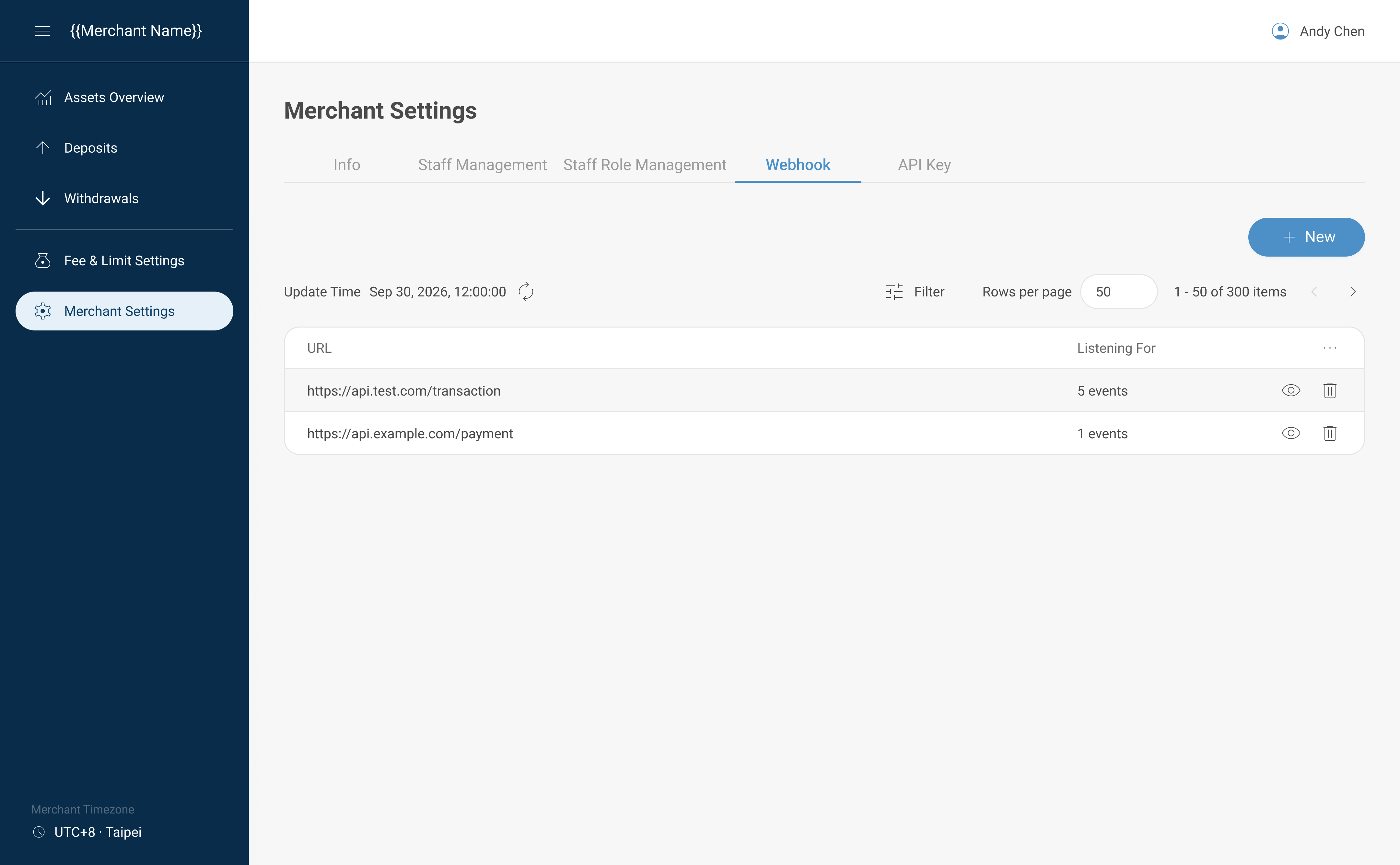
To create one:
- Sign in to the merchant Console.
- Open Merchant Settings, then select the Webhook tab.
- Select New.
- Enter your Callback URL. The URL must use
https://. Plainhttp://endpoints are rejected. - Under Event List, select the events you want to receive. See Events for the full list.
- Select Submit.
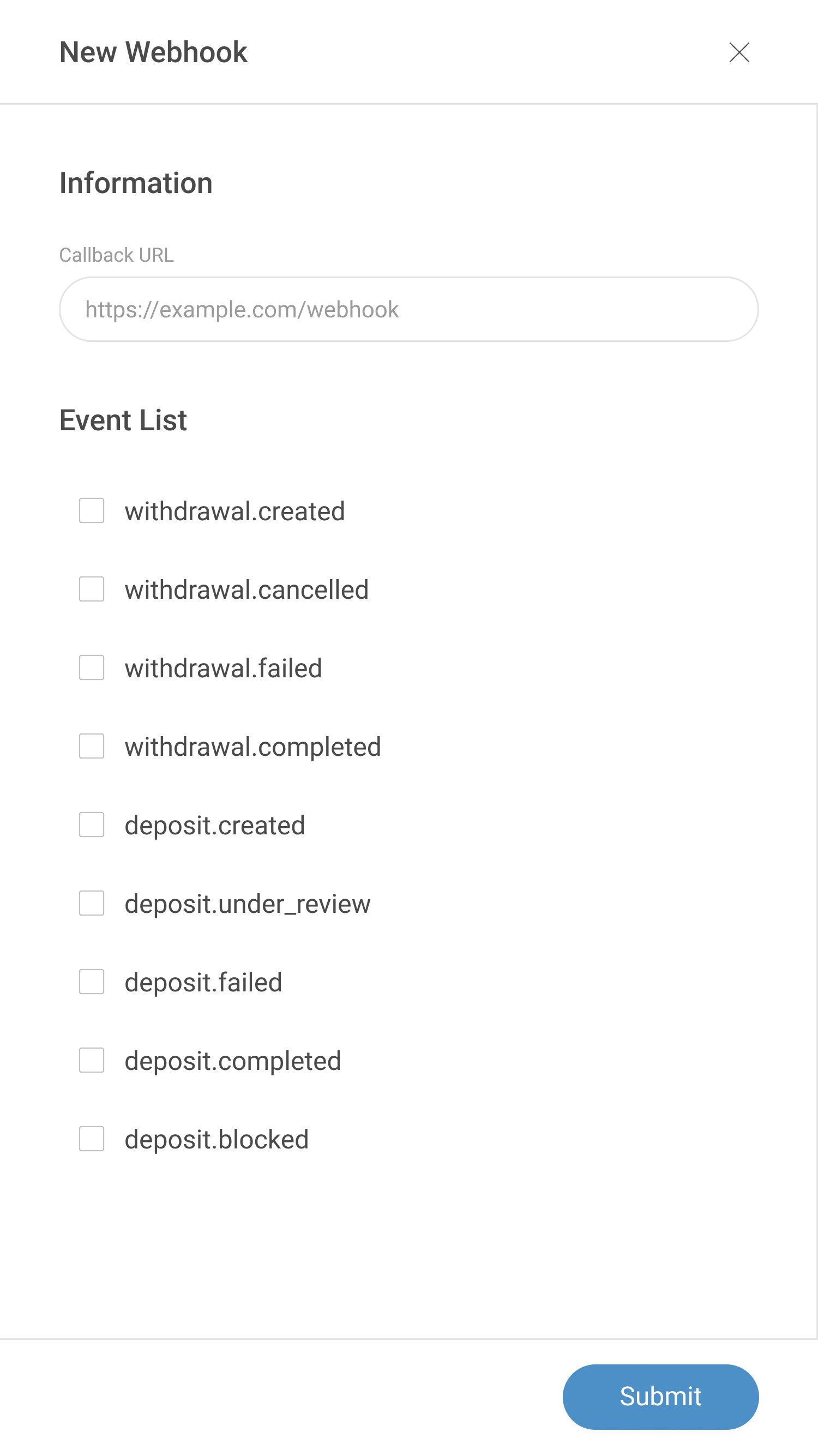
You can create multiple subscriptions, for example one pointing at your test endpoint and another at your production endpoint, and each subscription can listen to a different set of events.
Stop Receiving Events
To stop receiving webhooks, delete the subscription:
- Open Merchant Settings, then select the Webhook tab.
- Find the subscription you no longer want.
- Select the delete icon at the end of its row, then confirm.
Deleted subscriptions no longer appear in the list, and no further events are sent to that endpoint. There is no enable/disable switch — deleting is how you turn a subscription off, and you can create a new subscription for the same URL later if you need it again.
To stop only some events rather than all of them, edit the subscription and clear those events from the Event List instead. A subscription with no events selected keeps its Callback URL but receives nothing.
Endpoint Requirements
Your endpoint must:
- Be reachable over HTTPS. HTTP endpoints are not accepted.
- Respond directly with a status code. Redirects (
3xx) are not followed and are treated as a delivery failure. - Return a
2xxstatus code (200–299) within 10 seconds. Any other status, or no response within the timeout, is recorded as a failed delivery.
Build Your Endpoint
Read the event from the request body and branch on the eventKey field. Acknowledge the request before running any slow work, so you always respond within the timeout window.
import express from "express";

const app = express();
app.use(express.json());

app.post("/webhooks/esingpay", (req, res) => {
  const event = req.body;

  // Acknowledge receipt immediately so eSingPay does not time out.
  res.sendStatus(200);

  // Process the event asynchronously, after responding.
  switch (event.eventKey) {
    case "deposit.completed":
      // Credit the customer, mark the order paid, etc.
      handleDepositCompleted(event.data);
      break;
    case "withdrawal.completed":
      handleWithdrawalCompleted(event.data);
      break;
    default:
      // Unhandled event type — return 2xx and ignore.
      break;
  }
});

app.listen(4242);
:::tip Return 2xx quickly
Do all heavy processing — database writes, downstream API calls, notifications — after you respond, or offload it to a background job. If your handler is still working when the 10-second timeout elapses, the delivery is marked as failed.
:::
Verify Events
Because a webhook endpoint is a public URL, you should confirm that each event reflects real account activity before acting on it — especially for events that release funds or fulfill an order.
The recommended pattern is look up the resource by ID through the REST API and act on the authoritative response rather than trusting the webhook body alone:
async function handleDepositCompleted(data) {
  // Re-fetch the deposit from the REST API using the id in the event.
  const deposit = await esingpay.deposits.retrieve(data.id);

  if (deposit.status === "completed") {
    // Safe to act on a confirmed, server-verified state.
    fulfillOrder(deposit);
  }
}
See Retrieve a deposit and Retrieve a withdrawal intent.
:::note Signature verification Webhook requests are not signed in the current release. Requests do not carry a signature header, so you cannot yet cryptographically verify the sender. Until signing is available, restrict trust by re-fetching resources through the REST API (as shown above) rather than acting on the webhook body alone. Request signing is planned for a future release. :::
Design Idempotent Handlers
eSingPay sends each event once and does not retry, so under normal operation you will not receive the same delivery id twice.
Even so, design your endpoint to be idempotent — processing the same state change more than once must not cause a double effect (for example, crediting a balance twice). Because delivery is best-effort, you should also reconcile through the REST API, and that means the same state change can reach your system from two sources: the webhook and your reconciliation job.
Each delivery carries a stable identifier in the id field of the payload. Key your processing on that delivery id — or on the resource id together with its status — and skip anything you have already handled:
if (await alreadyProcessed(event.id)) {
  return res.sendStatus(200); // Already handled — acknowledge and skip.
}
await markProcessed(event.id);
Delivery and Retries
- Each event is delivered as a single
POSTattempt. Failed deliveries are not retried automatically in the current release, so treat webhooks as a best-effort notification rather than a guaranteed one. - Events are not guaranteed to arrive in order. Use the
occurredAttimestamp and the resourcestatusto determine the current state, and re-fetch via the REST API when ordering matters. - Because delivery is best-effort, keep the REST API as your source of truth. Reconcile periodically by listing deposits and withdrawal intents so a missed webhook never leaves your records out of sync.
- The Console does not provide a delivery history view or a way to resend a past delivery. To turn a subscription off, see Stop Receiving Events.
Test and Go Live
- Deploy your endpoint to a publicly reachable HTTPS URL. For local development, use a tunneling tool (such as ngrok or Cloudflare Tunnel) to expose your local server over HTTPS.
- Create a webhook subscription pointing at that test endpoint and subscribe to the events you handle.
- Trigger real activity — for example, make a small deposit — and confirm your endpoint receives and processes the event.
- Once verified, create another subscription pointing at your production endpoint URL.
eSingPay does not provide a separate staging environment — subscriptions are created the same way regardless of whether the endpoint URL points at your test server or your production server.
Next Steps
- Review the Events reference for event types, headers, and payload examples.
- Read Authentication to call the REST API from your webhook handler.
- See the Deposit and Withdrawal Intent models for the fields inside
data.